Table of Contents
This article describes Authlete’s Service Access Tokens (SATs).
A SAT is a bearer credential issued for a single Authlete service. It is the credential your Authorization Server, Resource Server, CLI scripts, or CI/CD pipelines present when calling Authlete’s runtime and service-administration APIs.
Permission customization, either via a preset or by selecting individual permissions, lets you scope a token to exactly what its caller needs, so a Resource Server only gets introspection rights, an administrative tool only gets the client-management rights it requires, and so on.
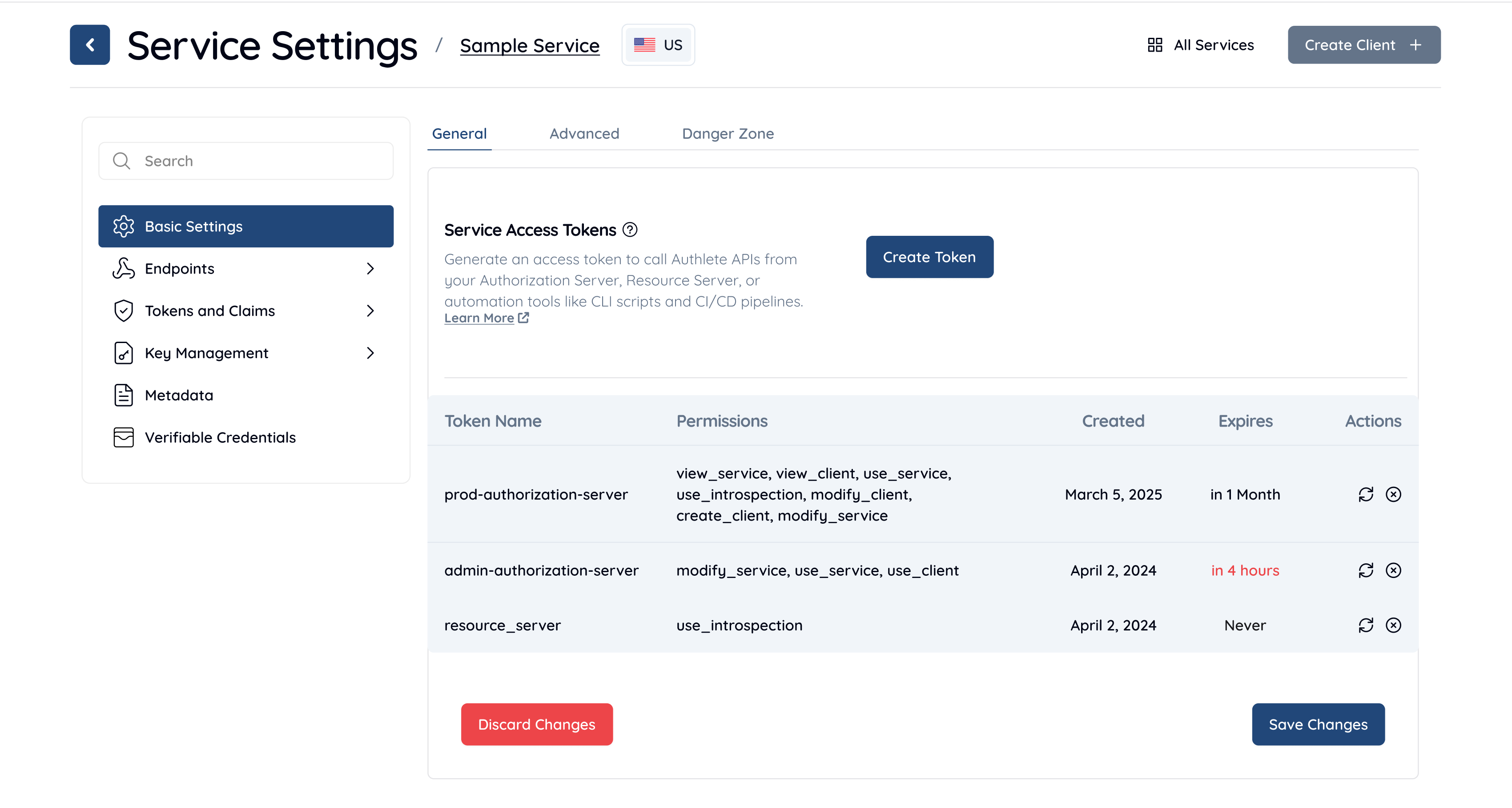
A human-readable identifier used to distinguish tokens in the Service Access Tokens list. The name has no effect on token behavior or permissions.
Specifies when the token will expire and become invalid.
For tokens used by automation, an explicit expiration date is strongly recommended. The console renders any token expiring within one month in red.
The token value is displayed only once, when the token is created or rotated.
Tokens can be rotated to generate a new value.
All Service Access Tokens are listed in a table with the following columns:
Pre-configured permission sets aligned to standard OAuth 2.0 roles. Selecting a preset applies a fixed combination of permissions; if you then add or remove permissions manually, the preset is cleared.
| Preset | Description | Permissions |
|---|---|---|
| Authorization Server | Grants access to all runtime OAuth/OIDC endpoints required by a standard Authorization Server. | use_ |
| Admin Authorization Server | Default selection. Full administrative control over the service. Includes runtime endpoints, client management, and service configuration. | modify_ |
| Resource Server | Minimal access required to validate access tokens at a Resource Server. | use_ |
Permissions can be selected individually when a preset does not match your use case. Permissions follow the inheritance rules described in Permission Inheritance and selecting a higher-level permission implicitly grants the lower-level ones.
If both preset and permissions are omitted, the Create button is
disabled. You must select a preset or at least one permission before the
token can be issued. If a preset is selected and the caller then adds or
removes individual permissions, the preset is cleared.
use_serviceRuntime OAuth/OIDC operations. The standard permission for an Authorization Server deployment. Allows calling:
/auth/authorization /auth/token /auth/userinfo /auth/introspection /auth/revocation /pushed_auth_req /service/configuration /service/jwks/get /backchannel/authentication /device/authorization /device/verification /device/complete /federation/* /vci/* (Verifiable Credentials)/jose/verify /idtoken/reissue /token/create /token/update /token/delete /token/revoke /token/get/list /rs/sign /hsk/get /client/authorization/get/list /client/registration (Dynamic Client Registration)Also implicitly grants use_,
view_, and view_.
use_introspectionToken introspection only. The minimum permission a Resource Server needs to validate access tokens. Allows calling:
/auth/introspection /auth/introspection/standard Does not grant access to authorization, token, or other runtime endpoints.
view_serviceRead service configuration. Allows calling:
/service/get /service/get/list Also implicitly grants view_. Use this for monitoring
dashboards or read-only integrations.
view_clientRead client details. Allows calling:
/client/get /client/get/list /client/granted_scopes/get /client/extension/requestable_scopes/get Does not allow creating, modifying, or deleting clients. Use this for audit tools or dashboards that inspect client registrations.
modify_clientUpdate and delete clients, including the endpoints required to perform user logout via authorization deletion. Allows calling:
/client/update /client/delete /client/secret/update /client/secret/refresh /client/lock_flag/update /client/extension/requestable_scopes/update /client/granted_scopes/delete /client/authorization/delete (user session revocation / logout)/client/authorization/update Also implicitly grants view_.
create_clientRegister new OAuth clients programmatically. Allows calling:
/client/create /client/get/default Also implicitly grants use_,
modify_, view_, and
view_. Use this for platforms that dynamically
provision OAuth clients.
modify_serviceFull service administration. Allows calling:
/service/update /hsk/create /hsk/delete /client/extension/requestable_scopes/delete Subsumes all other SAT permissions. Use this for admin tools or CI/CD pipelines that need complete control over the service.
Higher-level permissions implicitly grant the lower-level permissions they depend on. The inheritance chain is:
modify_service → all permissionscreate_client → use_service , modify_client , view_service , view_client use_service → use_introspection , view_service , view_client modify_client → view_client view_service → view_client Send the token as a bearer credential on the Authorization header of any
Authlete service-level API call. Pair it with your Service ID and the
appropriate API server URL.
The following is an example token-endpoint call from an Authorization Server
using a SAT that holds the use_ permission.
curl --oauth2-bearer ${SERVICE_ACCESS_TOKEN} \
  https://${AUTHLETE_SERVER}/api/${SERVICE_ID}/auth/token \
  --data-urlencode "parameters=grant_type=authorization_code&code=…&redirect_uri=…" \
  --data-urlencode "clientId=client001" \
  --data-urlencode "clientSecret=${CLIENT_SECRET}"
The following is an example introspection call from a Resource Server using a
SAT that holds only use_.
curl --oauth2-bearer ${SERVICE_ACCESS_TOKEN} \
  https://${AUTHLETE_SERVER}/api/${SERVICE_ID}/auth/introspection \
  --json '{
  "token": "${ACCESS_TOKEN_TO_VALIDATE}"
}'
The API server checks the token’s permissions on every call. If the token does
not hold the permission required by the endpoint, the response is
403 Forbidden. For example, a token holding only
use_ cannot call /auth.
Service Access Tokens are issued by the Authlete IdP’s
/api endpoint. The Management
Console calls this endpoint on your behalf when an administrator clicks
Create Token; the endpoint authenticates the caller as an IdP user
(via session or user access token) and requires the
MODIFY_SERVICE privilege on the target service. Service
Access Tokens and Organization Access Tokens are not accepted as the bearer
credential for this endpoint.
The request body the console submits has the following shape.
| Request Parameter | Necessity | Description |
|---|---|---|
serviceId |
REQUIRED | The ID of the service the token is scoped to. |
organization |
REQUIRED | The ID of the organization that owns the service. |
api |
REQUIRED | The ID of the API server (cluster) hosting the service. |
description |
REQUIRED | Human-readable name shown in the console and used to distinguish tokens. |
preset |
REQUIRED | One of standard_as, admin_as, resource_server, or custom. |
permissions |
CONDITIONAL | Explicit permission list. Required when preset is custom; rejected for any other preset. Permissions must be drawn from use_, use_, view_, view_, create_, modify_, modify_. |
durationSeconds |
OPTIONAL | Lifetime of the token, in seconds from creation. Omit (or set to null) for a token that never expires. |
The response body shape is as follows.
{
  "serviceId": 12345,
  "organizationId": 67890,
  "apiServerId": 111,
  "accessToken": "sat_3Yq9bP0u1NiqU6Pz_uIH7n3Z2bP7Sg5K…",
  "tokenId": "01HW…",
  "description": "prod-as",
  "permissions": ["use_service"],
  "createdAt": "2026-05-12T07:34:22Z",
  "expiresAt": "2026-06-11T07:34:22Z"
}
If an Authlete API call fails with HTTP 403 Forbidden, the response body
includes a resultMessage that names the exact permission the endpoint
requires.
[A457101] (/client/create) Function requires access rights ([CREATE_CLIENT])
for service (233044842478), access token does not have sufficient access.
[A456101] (/client/delete/{clientIdentifier}) Function requires access rights
([MODIFY_CLIENT]) for service (1495709902) and client (4140464843).
Map the bracketed access right (for example [CREATE_CLIENT],
[MODIFY_CLIENT]) to a permission in Custom Permissions
and reissue the token with that permission. Two options:
modify_service ) covers every client-management and
service-management endpoint.create_client ; that single permission implicitly grants
use_service , modify_client ,
view_service , and view_client .resultMessage access right |
Endpoint(s) | Minimum permission to fix |
|---|---|---|
[CREATE_CLIENT] |
/client, /client |
create_ (or modify_) |
[MODIFY_CLIENT] |
/client, /client, /client, /client, … |
modify_ (or create_ / modify_) |
[MODIFY_SERVICE] |
/service, /hsk, /hsk |
modify_ |
[USE_INTROSPECTION] |
/auth, /auth |
use_ (or use_) |
[VIEW_CLIENT] |
/client, /client, /client |
view_ (or any higher-level permission) |
[VIEW_SERVICE] |
/service, /service |
view_ (or any higher-level permission) |
| Use case | Recommended preset | Key permission |
|---|---|---|
| Standard Authorization Server | Authorization Server | use_ |
| Resource Server (introspection only) | Resource Server | use_ |
| User logout / session management | Custom | modify_ |
| Dynamic client provisioning | Custom | create_ |
| Monitoring / inventory dashboards | Custom | view_ |
| Client audit / configuration review | Custom | view_ |
use_introspection ; a read-only dashboard should hold only
view_service . Reserve modify_service for
trusted admin tooling.Service Access Tokens give Authlete deployments a single, scoped credential for each runtime workload that calls Authlete APIs. The preset model covers the standard Authorization Server, Resource Server, and admin use cases out of the box, while custom permissions and the inheritance rules make it straightforward to mint a least-privilege token for any other integration.
For more information, please contact us via the contact form.


