Table of Contents
This article explains the procedure for issuing Verifiable Credentials (VCs) that comply with the OpenID4VC High Assurance Interoperability Profile 1.0 (hereinafter “HAIP”).
Regarding the VC issuance procedure, HAIP can be broadly seen as a combination of OpenID for Verifiable Credential Issuance 1.0 (hereinafter “OID4VCI”) and the FAPI 2.0 Security Profile (hereinafter “FAPI2SP”). However, there are some important differences to be aware of, which are outlined below.
In FAPI2SP, the following mechanisms can be used to achieve sender-constrained access tokens.
In contrast, HAIP permits only DPoP.
In FAPI2SP, the following client authentication methods are available.
In HAIP, in addition to these, OAuth 2.0 Attestation-Based Client Authentication (hereinafter “ABCA”) is also supported.
attest_jwt_client_auth (ABCA)Note that when using ABCA in the context of HAIP, the client attestation must
include the x5c header parameter. In addition, the X.509 certificate
containing the public key for signature verification (i.e., the leaf
certificate in the certificate chain) must not be self-signed.
OID4VCI defines several formats for Key Proofs included in a credential
request. Among them, the jwt Proof Type (OID4VCI Appendix F.1)
allows a Key Attestation (OID4VCI Appendix D) to be specified in
the key_attestation header parameter. In addition, the
attestation Proof Type (OID4VCI Appendix F.3) allows the Key
Attestation itself to be used directly as the Key Proof.
When using a Key Attestation in the context of HAIP, it must include the x5c
header parameter. Furthermore, the X.509 certificate containing the public key
for signature verification (i.e., the leaf certificate in the certificate chain)
must not be self-signed.
In general, an access token is associated with one or more scopes. In the context of HAIP, those scopes must include at least one that refers to a specific credential configuration.
More specifically, the access token must be associated with the value of the
scope property of at least one credential configuration listed in
credential_ in the Credential
Issuer Metadata.
An overview of the VC issuance procedure using the authorization code flow is as follows:
However, since each request requires various tokens, the actual procedure becomes more complex. The following outlines the procedure, including the generation of those tokens.
In this section, we will walk through the actual procedure.
For the scripts used to generate the various tokens, as well as the private keys, public keys, and certificates, we use those published in authlete/oid4vci-demo.
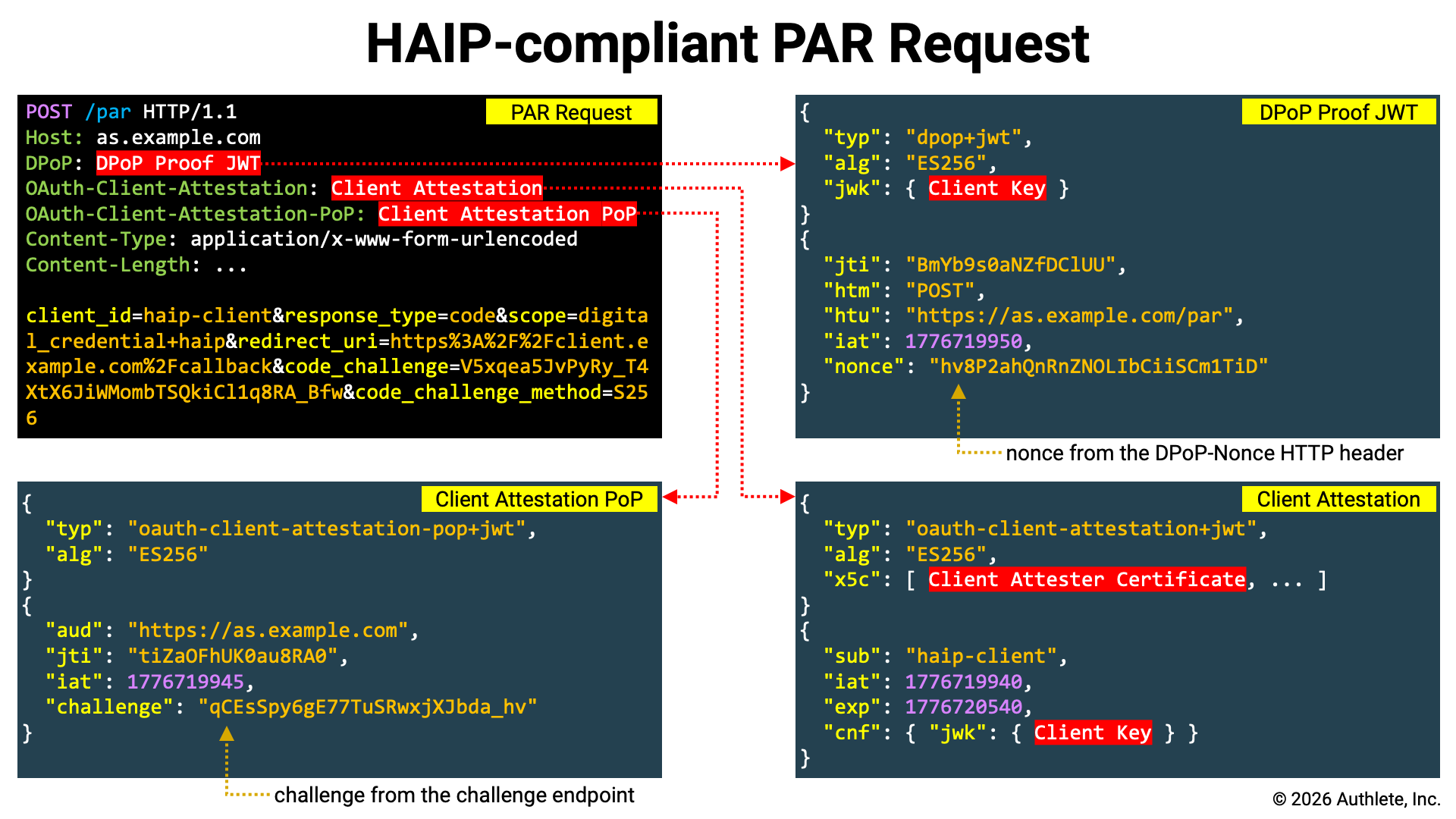
HAIP is based on FAPI2SP, and since FAPI2SP mandates the use of PAR, PAR is also required for HAIP-compliant authorization requests. Here, we register the authorization request at the PAR endpoint and obtain a request URI.
HAIP is based on FAPI2SP, and since FAPI2SP mandates the use of PKCE,
HAIP-compliant authorization requests must include a code challenge, and token
requests must include a code verifier. Therefore, we use the pkce script to
generate them.
./pkce
Output:
CODE_VERIFIER=3HlzvGOxhJz3jK2fwstAM8aV2GvqzWFpvfnyOGm53kk
CODE_CHALLENGE=elpP-j7DRK-dvxy4GBOzSr4EjnWzwRBquR-mY-ijtT8
By using the shell built-in command eval as shown below, you can directly
assign the output of the pkce script to shell variables.
eval "$(./pkce)"
A client attestation can be generated using the
generate- script. Note that in HAIP,
the x5c header parameter is required, so you must use the --x5c option to
specify the X.509 certificates to be included in the x5c header parameter.
The --x5c option can be specified multiple times, and the X.509 certificates
are added to the x5c header parameter in the order they are provided.
CLIENT_ATTESTATION=`./generate-client-attestation \
  --attester-key=keys/client-attester-private.jwk \
  --client-id=${CLIENT_ID} \
  --client-key=client.jwk \
  --x5c=keys/client-attester-certificate.pem`
Below is an example of the header and payload of a generated Client Attestation.
{
  "typ": "oauth-client-attestation+jwt",
  "alg": "ES256",
  "x5c": [
    "MIIBnTCCAUOgAwIBAgIUZr+BYJKFUDY6CIbWubXMjo1cEH8wCgYIKoZIzj0EAwIw
     HzEdMBsGA1UEAwwUQ2xpZW50IEF0dGVzdGVyIFJvb3QwIBcNMjYwNDE0MTc1OTQy
     WhgPNDc2NDAzMTExNzU5NDJaMBoxGDAWBgNVBAMMD0NsaWVudCBBdHRlc3RlcjBZ
     MBMGByqGSM49AgEGCCqGSM49AwEHA0IABI7riGciOegPsU1MJrSF5CnwImt7Cjzx
     YIgSpcLa4woMIxPaeKzhgHf+mi3qSset92VCeQIo0YljKsn6GS057bWjYDBeMAwG
     A1UdEwEB/wQCMAAwDgYDVR0PAQH/BAQDAgeAMB0GA1UdDgQWBBRwEoaaN/q/s+jX
     HSE2bybFF82G3zAfBgNVHSMEGDAWgBQ5hrFgDwFhQ8FuCJQETUlyd2pj0jAKBggq
     hkjOPQQDAgNIADBFAiEA2YOKXOd7UgtSMbVs0mMlss3RNXnMMK2RF2JlkrHQemIC
     IAY6Qx5VxmHwovlc0PJgrCDOQZZRUOKBoedy6AoXLSYh"
  ],
  "kid": "I6NQ3o1a3D2LW4pExAS620B3Amw4pkbNoAcxzkygYhM"
}
{
  "sub": "trial_client",
  "iat": 1776702629,
  "exp": 1776789029,
  "cnf": {
    "jwk": {
      "crv": "P-256",
      "kty": "EC",
      "x": "1AmVr4GoHdPgk48LWdS3T9m6m1mP4VTcj9usoSBnCQk",
      "y": "te-WIuUIq2w8tXmXydlEX4pe9lNe-PBcozA8n7y8XTE"
    }
  }
}
Please note the following points:
typ header parameter is oauth-client-attestation+jwt .x5c header parameter includes the X.509 certificate for signature verification (as specified with the --x5c option).sub claim is set to the client identifier (as specified with the --client-id option).cnf.jwk claim contains the client’s key (as specified with the --client-key option).According to the ABCA specification, if the authorization server
provides a challenge endpoint, the attestation challenge issued from
that endpoint must be embedded in the Client Attestation PoP. Whether the
authorization server provides a challenge endpoint can be determined by
checking if the challenge_ parameter is included
in the server metadata.
The challenge endpoint accepts an HTTP POST request and returns JSON containing
an attestation_ property. Below is an example of
a request and response excerpted from the ABCA specification.
Attestation Challenge Request Example:
POST /as/challenge HTTP/1.1
Host: as.example.com
Accept: application/json
Attestation Challenge Response Example:
HTTP/1.1 200 OK
Host: as.example.com
Content-Type: application/json
Cache-Control: no-store

{
  "attestation_challenge": "AYjcyMzY3ZDhiNmJkNTZ"
}
If the URL of the challenge endpoint is stored in a shell variable named
CHALLENGE_, you can assign the value of the
attestation challenge to a shell variable named CHALLENGE by executing
the following command.
CHALLENGE=`curl ${CHALLENGE_ENDPOINT} \
  -X POST | \
  jq -r .attestation_challenge`
A client attestation PoP can be generated using the
generate- script. If you need to
include a challenge claim, specify the --challenge option.
CLIENT_ATTESTATION_POP=`./generate-client-attestation-pop \
  --as-id=${AUTHORIZATION_SERVER} \
  --client-key=client.jwk \
  --challenge=${CHALLENGE}`
Below is an example of the header and payload of a generated Client Attestation PoP.
{
  "typ": "oauth-client-attestation-pop+jwt",
  "alg": "ES256",
  "kid": "7yNhIHVeaPFIB_0k-YpiFATomCLpxIv-e2AAFmCRBLE"
}
{
  "aud": "https://trial.authlete.net",
  "jti": "tiZaOFhUK0au8RA0",
  "iat": 1776704669,
  "exp": 1776791069,
  "challenge": "HECMLA_LpoE9hSDlVP4yptT2i1zOnOdkIPnVa39rInA"
}
Please note the following points:
typ header parameter is oauth-client-attestation-pop+jwt .aud claim is set to the authorization server identifier (as specified with the --as-id option).challenge claim is set to the attestation challenge (as specified with the --challenge option).Since FAPI2SP states the following, the authorization code must also be DPoP-bound.
if using DPoP, shall support “Authorization Code Binding to DPoP Key” (as required by Section 10.1 of RFC9449);
This can be achieved either by adding the dpop_jkt request parameter to the
request registered at the PAR endpoint, or by including a DPoP Proof JWT.
As noted in the specification, using a DPoP Proof JWT simplifies the implementation (since the client can consistently include a DPoP Proof JWT in all requests sent to the authorization server, regardless of the request type). Therefore, in this article, we will generate a DPoP Proof JWT.
Use the generate-dpop-proof script to generate a DPoP Proof JWT by passing
the -m POST option (to specify the HTTP method for the PAR request), the
-u $PAR_ENDPOINT option (to specify the PAR endpoint URL), and the
-k client.jwk option (to specify the client’s key).
DPOP_PROOF=`./generate-dpop-proof \
  -m POST \
  -u ${PAR_ENDPOINT} \
  -k client.jwk`
Below is an example of the header and payload of a generated DPoP Proof JWT.
{
  "typ": "dpop+jwt",
  "alg": "ES256",
  "jwk": {
    "kty": "EC",
    "alg": "ES256",
    "crv": "P-256",
    "x": "1AmVr4GoHdPgk48LWdS3T9m6m1mP4VTcj9usoSBnCQk",
    "y": "te-WIuUIq2w8tXmXydlEX4pe9lNe-PBcozA8n7y8XTE"
  }
}
{
  "jti": "zrZOAIoZJvCbEQrM",
  "htm": "POST",
  "htu": "https://trial.authlete.net/api/par",
  "iat": 1776708531
}
Please note the following points:
typ header parameter is dpop+jwt.jwk header parameter contains the client’s key (as specified with the -k option).htm claim is set to the HTTP method of the PAR request (as specified with the -m option).htu claim is set to the URL of the PAR endpoint (as specified with the -u option).Now that the required tokens are ready, send the PAR request.
curl ${PAR_ENDPOINT} \
  -H "OAuth-Client-Attestation: ${CLIENT_ATTESTATION}" \
  -H "OAuth-Client-Attestation-PoP: ${CLIENT_ATTESTATION_POP}" \
  -H "DPoP: ${DPOP_PROOF}" \
  -d client_id=${CLIENT_ID} \
  -d response_type=code \
  -d scope=digital_credential+haip \
  -d redirect_uri=${REDIRECT_URI} \
  -d code_challenge=${CODE_CHALLENGE} \
  -d code_challenge_method=S256
The key points of this request are as follows:
| Item | Description |
|---|---|
| Client Authentication | When using ABCA, set the Client Attestation and the Client Attestation PoP in the OAuth- and OAuth- HTTP headers, respectively. |
| Sender-Constrained | Set the DPoP Proof JWT in the DPoP HTTP header. |
client_ |
The client_ request parameter is required in the authorization request. |
response_ |
In FAPI2SP, the value of the response_ request parameter must be code (no other values are allowed). |
scope |
To comply with the HAIP specification, the scope request parameter must include a scope corresponding to at least one credential configuration. In this example, it is assumed that the string digital_ is configured as the scope property of some credential configuration. Additionally, this example includes the haip scope. |
redirect_ |
The redirect_ request parameter is required in FAPI2SP. |
code_ |
Since PKCE is mandatory in FAPI2SP, the code_ request parameter must be included. |
code_ |
Since FAPI2SP requires the use of S256 as the code challenge method, code_ must be explicitly included. |
If the PAR request is successful, the PAR endpoint returns JSON containing a
request_ property. Below is an example of a PAR response
excerpted from the PAR specification.
HTTP/1.1 201 Created
Cache-Control: no-cache, no-store
Content-Type: application/json

{
  "request_uri": "urn:example:bwc4JK-ESC0w8acc191e-Y1LTC2",
  "expires_in": 90
}
The value of the request_ property is the issued
request URI. This request URI will later be used as the value of the
request_ request parameter in the authorization request.
Send an authorization request to the authorization endpoint of the authorization
server via the browser. At that time, use the request URI issued by the PAR
endpoint as the value of the request_ request parameter.
${AUTHORIZATION_ENDPOINT}?client_id=${CLIENT_ID}&request_uri=${REQUEST_URI}
When the user completes authentication and grants consent on the authorization
page returned by the authorization endpoint, an authorization code is issued.
This authorization code will later be used as the value of the code request
parameter in the token request.
The Client Attestation and Client Attestation PoP are also required for the token request; however, if they have not yet expired, those created for the PAR request can be reused.
On the other hand, the DPoP Proof JWT cannot be reused, because the htu claim
must be set to the URL of the target endpoint. Therefore, you must regenerate
the DPoP Proof JWT by rerunning the generate-
script with the token endpoint URL specified via the -u option.
DPOP_PROOF=`./generate-dpop-proof \
  -m POST \
  -u ${TOKEN_ENDPOINT} \
  -k client.jwk`
After preparing the required tokens, send the token request.
curl ${TOKEN_ENDPOINT} \
  -H "OAuth-Client-Attestation: ${CLIENT_ATTESTATION}" \
  -H "OAuth-Client-Attestation-PoP: ${CLIENT_ATTESTATION_POP}" \
  -H "DPoP: ${DPOP_PROOF}" \
  -d grant_type=authorization_code \
  -d code=${AUTHORIZATION_CODE} \
  -d redirect_uri=${REDIRECT_URI} \
  -d code_verifier=${CODE_VERIFIER}
The key points of this request are as follows:
| Item | Description |
|---|---|
| Client Authentication | When using ABCA, set the Client Attestation and the Client Attestation PoP in the OAuth- and OAuth- HTTP headers, respectively. |
| Sender-Constrained | Set the DPoP Proof JWT in the DPoP HTTP header. |
grant_ |
Set the value to authorization_ to indicate the authorization code flow. |
code |
Specify the authorization code issued as a result of the authorization request. |
redirect_ |
Specify the same redirect URI that was included in the PAR request. |
code_ |
Specify the code verifier corresponding to the code challenge included in the PAR request. |
If the token request is successful, the token endpoint returns JSON containing
an access_ property.
HTTP/1.1 200 OK
Content-Type: application/json
Cache-Control: no-store

{
  "access_token": "zdRKYNzJ0hR99ztiBgd8TTXzQhbattjhtSd-NDykt1A",
  "token_type": "DPoP",
  "expires_in": 86400,
  "scope": "digital_credential haip",
  "refresh_token": "EiHKJFol1UOm7sa9CaKvlnmDH0TP4_takv1I7iWnHI8"
}
The value of the access_ property is the issued
access token. This access token will later be set in the Authorization
HTTP header of the credential request.
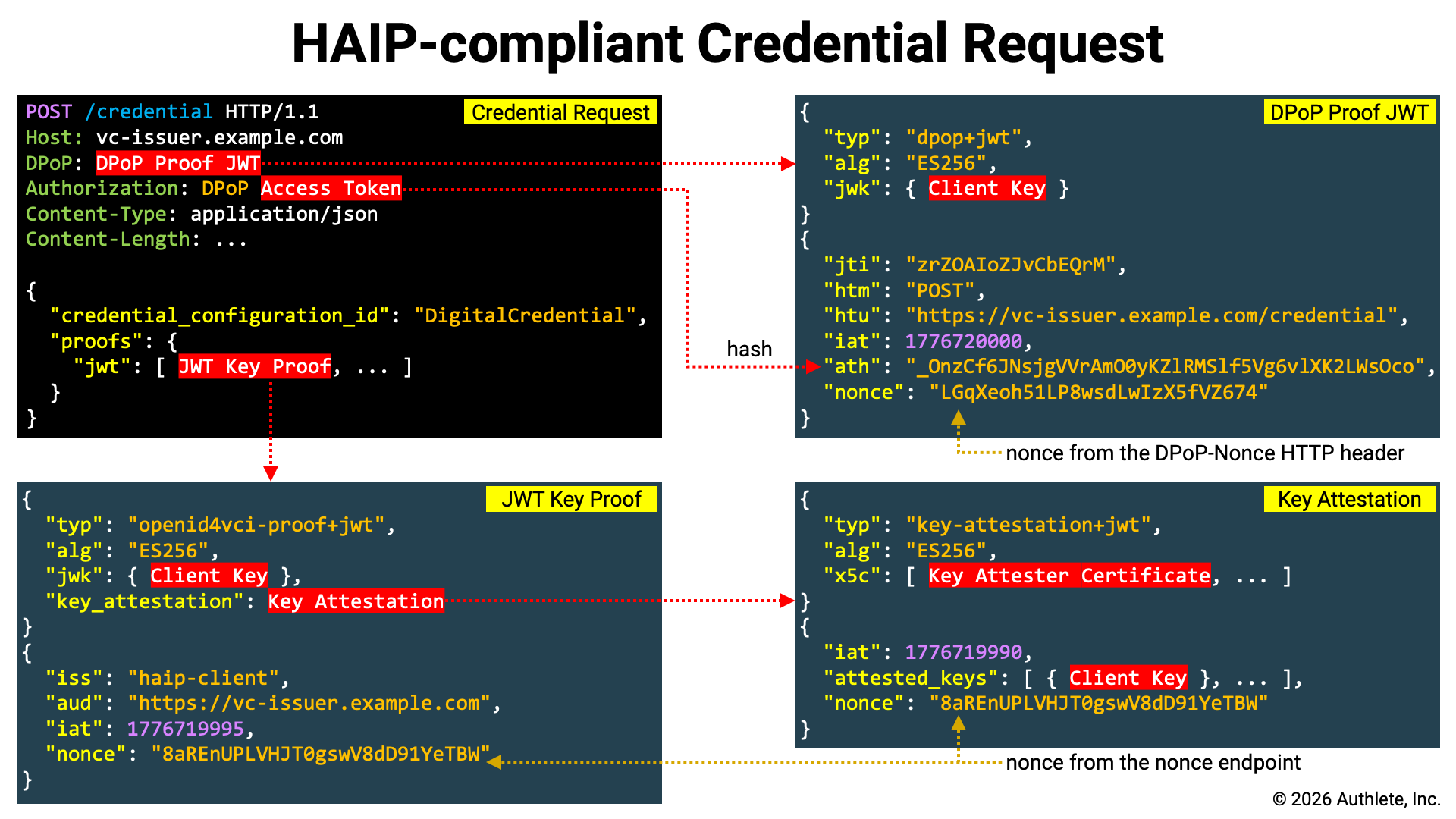
A literal interpretation of the HAIP specification suggests that it is not strictly required to include a Key Proof in the credential request. However, since it is difficult to imagine real-world use cases without key binding, the credential request example shown here includes a Key Proof.
If the credential issuer provides a nonce endpoint, the nonce issued by
that endpoint must be included in the Key Proof and Key Attestation. Whether
the credential issuer provides a nonce endpoint can be determined by checking
whether the nonce_ parameter is included in the
credential issuer metadata.
The nonce endpoint accepts an HTTP POST request and returns JSON containing a
c_nonce property. Below is an example of a request and response excerpted
from the OID4VCI specification.
Nonce Request Example:
POST /nonce HTTP/1.1
Host: credential-issuer.example.com
Content-Length: 0
Nonce Response Example:
HTTP/1.1 200 OK
Content-Type: application/json
Cache-Control: no-store
DPoP-Nonce: eyJ7S_zG.eyJH0-Z.HX4w-7v

{
  "c_nonce": "wKI4LT17ac15ES9bw8ac4"
}
If the URL of the nonce endpoint is stored in a shell variable named
NONCE_, you can assign the value of the nonce to a
shell variable named NONCE by executing the following command.
NONCE=`curl ${NONCE_ENDPOINT} \
  -X POST | \
  jq -r .c_nonce`
A Key Attestation can be generated using the
generate- script. Note that in HAIP, the
x5c header parameter is mandatory, so you must use the --x5c option to
specify the X.509 certificates to be included in the x5c header parameter.
The --x5c option can be specified multiple times, and the X.509 certificates
are added to the x5c header parameter in the order in which they are provided.
KEY_ATTESTATION=`./generate-key-attestation \
  --attester-key=keys/key-attester-private.jwk \
  --attested-key=client.jwk \
  --nonce=${NONCE} \
  --x5c=keys/key-attester-certificate.pem`
Below is an example of the header and payload of a generated Key Attestation.
{
  "typ": "key-attestation+jwt",
  "alg": "ES256",
  "x5c": [
    "MIIBmDCCAT2gAwIBAgIUTD2qHZdvCkld8qneVGlwL4l+rWAwCgYIKoZIzj0EAwIw
     HDEaMBgGA1UEAwwRS2V5IEF0dGVzdGVyIFJvb3QwIBcNMjYwNDE0MTkwODQ1WhgP
     NDc2NDAzMTExOTA4NDVaMBcxFTATBgNVBAMMDEtleSBBdHRlc3RlcjBZMBMGByqG
     SM49AgEGCCqGSM49AwEHA0IABEj5wOUzDlQKX800+V7kanDu8wASHTw6ivrO2HOW
     keWGUNXaToM14Z4EtyM/szOZYv0UOvsdXNLI1cnZAOgPp3+jYDBeMAwGA1UdEwEB
     /wQCMAAwDgYDVR0PAQH/BAQDAgeAMB0GA1UdDgQWBBTCXpsU7JVvhynt3n5r5baJ
     xPy21jAfBgNVHSMEGDAWgBRCjxuwwwG/DC9yI5yJ07oD04YvKzAKBggqhkjOPQQD
     AgNJADBGAiEAv3aywa9hsZM5d9zV70GHVP9qmbFleq4SZbmQzIBDNHMCIQDqBvWI
     G9avgr0k6TpwmzhomOTY1H0JigyGaZzuzBe9yQ=="
  ],
  "kid": "qLgVYBf9lZ63QsEz04r9zb4NN3iZnf2-dnoc2k1GWbA"
}
{
  "iat": 1776719761,
  "exp": 1776806161,
  "attested_keys": [
    {
      "crv": "P-256",
      "kty": "EC",
      "x": "1AmVr4GoHdPgk48LWdS3T9m6m1mP4VTcj9usoSBnCQk",
      "y": "te-WIuUIq2w8tXmXydlEX4pe9lNe-PBcozA8n7y8XTE"
    }
  ],
  "nonce": "8aREnUPLVHJT0gswV8dD91YeTBWEKa4YCAd2HpXcOYw"
}
Please note the following points:
typ header parameter is key-attestation+jwt .x5c header parameter includes the X.509 certificate for signature verification (as specified with the --x5c option).attested_keys claim contains the attested key(s) (as specified with the --attested-key option).nonce claim is set to the nonce (as specified with the --nonce option).A Key Proof of the JWT Proof Type can be generated using the
generate- script.
JWT_KEY_PROOF=`./generate-key-proof \
  --client-id=${CLIENT_ID} \
  --issuer=${CREDENTIAL_ISSUER} \
  --key=client.jwk \
  --nonce=${NONCE} \
  --key-attestation=${KEY_ATTESTATION}`
Below is an example of the header and payload of a generated Key Proof.
{
  "typ": "openid4vci-proof+jwt",
  "alg": "ES256",
  "jwk": {
    "crv": "P-256",
    "kty": "EC",
    "x": "1AmVr4GoHdPgk48LWdS3T9m6m1mP4VTcj9usoSBnCQk",
    "y": "te-WIuUIq2w8tXmXydlEX4pe9lNe-PBcozA8n7y8XTE"
  },
  "key_attestation":
    "eyJ0eXAiOiJrZXktYXR0ZXN0YXRpb24rand0IiwiYWxnIjoiRVMyNTYiLCJ4NWMi
     OlsiTUlJQm1EQ0NBVDJnQXdJQkFnSVVURDJxSFpkdkNrbGQ4cW5lVkdsd0w0bCty
     V0F3Q2dZSUtvWkl6ajBFQXdJd0hERWFNQmdHQTFVRUF3d1JTMlY1SUVGMGRHVnpk
     R1Z5SUZKdmIzUXdJQmNOTWpZd05ERTBNVGt3T0RRMVdoZ1BORGMyTkRBek1URXhP
     VEE0TkRWYU1CY3hGVEFUQmdOVkJBTU1ERXRsZVNCQmRIUmxjM1JsY2pCWk1CTUdC
     eXFHU000OUFnRUdDQ3FHU000OUF3RUhBMElBQkVqNXdPVXpEbFFLWDgwMCtWN2th
     bkR1OHdBU0hUdzZpdnJPMkhPV2tlV0dVTlhhVG9NMTRaNEV0eU0vc3pPWll2MFVP
     dnNkWE5MSTFjblpBT2dQcDMrallEQmVNQXdHQTFVZEV3RUIvd1FDTUFBd0RnWURW
     UjBQQVFIL0JBUURBZ2VBTUIwR0ExVWREZ1FXQkJUQ1hwc1U3SlZ2aHludDNuNXI1
     YmFKeFB5MjFqQWZCZ05WSFNNRUdEQVdnQlJDanh1d3d3Ry9EQzl5STV5SjA3b0Qw
     NFl2S3pBS0JnZ3Foa2pPUFFRREFnTkpBREJHQWlFQXYzYXl3YTloc1pNNWQ5elY3
     MEdIVlA5cW1iRmxlcTRTWmJtUXpJQkROSE1DSVFEcUJ2V0lHOWF2Z3IwazZUcHdt
     emhvbU9UWTFIMEppZ3lHYVp6dXpCZTl5UT09Il0sImtpZCI6InFMZ1ZZQmY5bFo2
     M1FzRXowNHI5emI0Tk4zaVpuZjItZG5vYzJrMUdXYkEifQ.eyJpYXQiOjE3NzY3M
     Tk3NjEsImV4cCI6MTc3NjgwNjE2MSwiYXR0ZXN0ZWRfa2V5cyI6W3siY3J2IjoiU
     C0yNTYiLCJrdHkiOiJFQyIsIngiOiIxQW1WcjRHb0hkUGdrNDhMV2RTM1Q5bTZtM
     W1QNFZUY2o5dXNvU0JuQ1FrIiwieSI6InRlLVdJdVVJcTJ3OHRYbVh5ZGxFWDRwZ
     TlsTmUtUEJjb3pBOG43eThYVEUifV0sIm5vbmNlIjoiOGFSRW5VUExWSEpUMGdzd
     1Y4ZEQ5MVllVEJXRUthNFlDQWQySHBYY09ZdyJ9.CeDXPV9gfr2x92IHSZ5BcyFf
     RuTK2M5Y4JeHFgijfZeNBytz1QICaxnLOVTZjXYu-JlL21_xkPoODrWTSiDPLg"
}
{
  "iss": "trial_client",
  "aud": "https://trial.authlete.net",
  "iat": 1776720642,
  "nonce": "8aREnUPLVHJT0gswV8dD91YeTBWEKa4YCAd2HpXcOYw"
}
Please note the following points:
typ header parameter is openid4vci-proof+jwt .jwk header parameter contains the client’s key (as specified with the --key option).key_attestation header parameter contains the Key Attestation (as specified with the --key-attestation option).iss claim is set to the client identifier (as specified with the --client-id option).aud claim is set to the credential issuer identifier (as specified with the --issuer option).nonce claim is set to the nonce (as specified with the --nonce option).Re-run the generate- script with the
credential endpoint URL specified via the -u option to regenerate the DPoP
Proof JWT.
Note that in the credential request, the DPoP Proof JWT is sent together with
the access token, so the DPoP Proof JWT must include an ath claim. Therefore,
when running the generate- script, add the
-a option.
DPOP_PROOF=`./generate-dpop-proof \
  -m POST \
  -u ${CREDENTIAL_ENDPOINT} \
  -k client.jwk \
  -a ${ACCESS_TOKEN}`
Now that the Key Proof has been prepared, send the credential request. In this
example, it is assumed that the identifier of the credential configuration
associated with the digital_ scope is
Digital.
curl ${CREDENTIAL_ENDPOINT} \
  -H "Authorization: DPoP ${ACCESS_TOKEN}" \
  -H "DPoP: ${DPOP_PROOF}" \
  --json '{
  "credential_configuration_id": "DigitalCredential",
  "proofs": {
    "jwt": ["'${JWT_KEY_PROOF}'"]
  }
}'
The key points of this request are as follows:
| Item | Description |
|---|---|
| Access Token | Set the access token issued by the token endpoint in the Authorization HTTP header. Since it is DPoP-bound, the scheme must be DPoP. |
| Sender-Constrained | Set the DPoP Proof JWT in the DPoP HTTP header. |
credential_ |
Either credential_ or credential_ is required in the credential request. |
proofs |
Specify the Key Proof |
In the request above, a key proof using the JWT Proof Type was used, and therefore the Key Attestation was embedded in a separate JWT.
In contrast, with a Key Proof using the Attestation Proof Type, the Key Attestation can be used directly as the Key Proof, as shown below.
curl ${CREDENTIAL_ENDPOINT} \
  -H "Authorization: DPoP ${ACCESS_TOKEN}" \
  -H "DPoP: ${DPOP_PROOF}" \
  --json '{
  "credential_configuration_id": "DigitalCredential",
  "proofs": {
    "attestation": ["'${KEY_ATTESTATION}'"]
  }
}'
The following is an example of a credential response.
{
  "credentials": [
    {
      "credential":
        "eyJ4NWMiOlsiTUlJQ1NEQ0NBZTZnQXdJQkFnSVVLSlM1R21Ram5mY0JrM1piL2VX
         K0loblFrOHN3Q2dZSUtvWkl6ajBFQXdJd1pURUxNQWtHQTFVRUJoTUNTbEF4RGpB
         TUJnTlZCQWdNQlZSdmEzbHZNUkF3RGdZRFZRUUhEQWREYUdsNWIyUmhNUmN3RlFZ
         RFZRUUtEQTVCZFhSb2JHVjBaU3dnU1c1akxqRWJNQmtHQTFVRUF3d1NkSEpwWVd3
         dVlYVjBhR3hsZEdVdWJtVjBNQ0FYRFRJMU1ESXlOVEExTXpJME9Wb1lEekl5T1Rn
         eE1qRXhNRFV6TWpRNVdqQmxNUXN3Q1FZRFZRUUdFd0pLVURFT01Bd0dBMVVFQ0F3
         RlZHOXJlVzh4RURBT0JnTlZCQWNNQjBOb2FYbHZaR0V4RnpBVkJnTlZCQW9NRGtG
         MWRHaHNaWFJsTENCSmJtTXVNUnN3R1FZRFZRUUREQkowY21saGJDNWhkWFJvYkdW
         MFpTNXVaWFF3V1RBVEJnY3Foa2pPUFFJQkJnZ3Foa2pPUFFNQkJ3TkNBQVFPZDZU
         Q3ducG5tWHFwczhSUUhxK0s5Tm9vRmJyamIxeXlGeEpsSGs3V2ZUVk9yWkR1OU5x
         K0lPYzl5cm83eStHOXJUZjB6dDhPV0o1aS9XaWpqSUxUbzNvd2VEQWRCZ05WSFE0
         RUZnUVVQTVlhNmZRSlA2TTZ4NHRZTTFmYmYzL0UweE13SHdZRFZSMGpCQmd3Rm9B
         VVBNWWE2ZlFKUDZNNng0dFlNMWZiZjMvRTB4TXdEd1lEVlIwVEFRSC9CQVV3QXdF
         Qi96QWxCZ05WSFJFRUhqQWNoaHBvZEhSd2N6b3ZMM1J5YVdGc0xtRjFkR2hzWlhS
         bExtNWxkREFLQmdncWhrak9QUVFEQWdOSUFEQkZBaUVBeW8zQS9vUVgvTWU4bXlN
         V0wwMjVjVEJ3L2tlY2VIRUxmU1FIbWxlNVFBRUNJQzVnL3luT210L251a3NmSEFl
         TUFCZjd0bzUyelRSa1JkdXFRQ1pITzNlWSJdLCJraWQiOiJaWUdJT0hZdUE5SXBV
         aWpWd1FOdWwzbkU1MzZ4MUpTV0hpT2ZkUzdzYWRnIiwidHlwIjoiZGMrc2Qtand0
         IiwiYWxnIjoiRVMyNTYifQ.eyJfc2QiOlsiM005WU43VXk0RHI0OFdCNEFhNmFEQ
         2NudUhxdi1lRUw2RVFITjBMb3ExbyIsIks2UVZHUmVyOVFId2tDYkpoNW1PVUNLO
         UwtX0luM0pPX2o2eUlQNzVJaGMiLCJQQ1M5dFBvMXlrb2NmV09iYzd0LUVObXU1M
         HdzekY3UTNxZ0MyTFN3dmhRIiwiUS1tdllZWFpfVk9SZlc2ekhXSnhaeC1fNUxwM
         EtNbG1lbGJPSUQ5Z3NyNCIsIlFfTjRKOHJnTnV5QS1Oa2RTVmdNR3pvN0RVM3lrW
         Dk5dk1zVEJzcklLN28iLCJYcjF6RnFETU5kdXp2UDFBZFZqWFV4WlQ5T1RJRW9kd
         TlSRmZ1c2FFYUJJIiwiWVNrSUNPRXI1dzZCY3lEQmVwck5sLXhGMmdheExtOGRaZ
         lp1NVRUcFpiUSIsIll4LXFYdi10a3Babnd6MkJkN1pyOXhlaDBGOE05bnJzdUkxT
         DdvaGlTNEkiLCJkS1pEUDhwYzdLbXlXNkVwSER2TVIxRnd0aDNKN0xoeldNRWgyW
         kh3UXRRIiwiZUFPQ1l0VmN0bVllNnF6eEJvOUh4TE9panZaSlRKSjBBR2pHblJrW
         WdsTSJdLCJ2Y3QiOiJodHRwczovL2NyZWRlbnRpYWxzLmV4YW1wbGUuY29tL2RpZ
         2l0YWxfY3JlZGVudGlhbCIsIl9zZF9hbGciOiJzaGEtMjU2IiwiaXNzIjoiaHR0c
         HM6Ly90cmlhbC5hdXRobGV0ZS5uZXQiLCJjbmYiOnsiandrIjp7Imt0eSI6IkVDI
         iwiY3J2IjoiUC0yNTYiLCJraWQiOiJPUmduOXZ5S2ZKZnI2SmljN1dtaVRFV0pCb
         FRZa1QwZS1JSU9NU3l2SXRvIiwieCI6IjFBbVZyNEdvSGRQZ2s0OExXZFMzVDltN
         m0xbVA0VlRjajl1c29TQm5DUWsiLCJ5IjoidGUtV0l1VUlxMnc4dFhtWHlkbEVYN
         HBlOWxOZS1QQmNvekE4bjd5OFhURSJ9fSwiZXhwIjoxNzc5MzEzOTg5LCJpYXQiO
         jE3NzY3MjE5ODl9.k_BY_BMZVLgNRqutBakVGgpcfq5DbbQdgGsGnTvDWRqZX4KN
         wbzEJd6bHZhIC7Di5_3QS_sUvByHnDpa95NJTw~WyIwbHlrWHpiLTNZR0kwZndVa
         ktMZk5BIiwic3ViIiwiMTAwNCJd~WyJ3Vi04VWk0MUp3eEpmYzN3WnQyaFRRIiwi
         Z2l2ZW5fbmFtZSIsIkluZ2EiXQ~WyJFWlZRUGI0ZFJzY01xa1dheEJmel9nIiwiZ
         mFtaWx5X25hbWUiLCJTaWx2ZXJzdG9uZSJd~WyJrT0ZrLVRFMzVlRlpRVzBrQnpR
         V3FnIiwiYmlydGhkYXRlIiwiMTk5MS0xMS0wNiJd~"
    }
  ]
}
Each element of the credentials array is a JSON object, and the value of its
credential property represents the issued VC. In this example, only one VC is
issued, and its format is SD-JWT VC.
Decoding the header and payload of the Issuer-signed JWT part of the issued SD-JWT VC yields the following.
{
  "x5c": [
    "MIICSDCCAe6gAwIBAgIUKJS5GmQjnfcBk3Zb/eW+IhnQk8swCgYIKoZIzj0EAwIw
     ZTELMAkGA1UEBhMCSlAxDjAMBgNVBAgMBVRva3lvMRAwDgYDVQQHDAdDaGl5b2Rh
     MRcwFQYDVQQKDA5BdXRobGV0ZSwgSW5jLjEbMBkGA1UEAwwSdHJpYWwuYXV0aGxl
     dGUubmV0MCAXDTI1MDIyNTA1MzI0OVoYDzIyOTgxMjExMDUzMjQ5WjBlMQswCQYD
     VQQGEwJKUDEOMAwGA1UECAwFVG9reW8xEDAOBgNVBAcMB0NoaXlvZGExFzAVBgNV
     BAoMDkF1dGhsZXRlLCBJbmMuMRswGQYDVQQDDBJ0cmlhbC5hdXRobGV0ZS5uZXQw
     WTATBgcqhkjOPQIBBggqhkjOPQMBBwNCAAQOd6TCwnpnmXqps8RQHq+K9NooFbrj
     b1yyFxJlHk7WfTVOrZDu9Nq+IOc9yro7y+G9rTf0zt8OWJ5i/WijjILTo3oweDAd
     BgNVHQ4EFgQUPMYa6fQJP6M6x4tYM1fbf3/E0xMwHwYDVR0jBBgwFoAUPMYa6fQJ
     P6M6x4tYM1fbf3/E0xMwDwYDVR0TAQH/BAUwAwEB/zAlBgNVHREEHjAchhpodHRw
     czovL3RyaWFsLmF1dGhsZXRlLm5ldDAKBggqhkjOPQQDAgNIADBFAiEAyo3A/oQX
     /Me8myMWL025cTBw/keceHELfSQHmle5QAECIC5g/ynOmt/nuksfHAeMABf7to52
     zTRkRduqQCZHO3eY"
  ],
  "kid": "ZYGIOHYuA9IpUijVwQNul3nE536x1JSWHiOfdS7sadg",
  "typ": "dc+sd-jwt",
  "alg": "ES256"
}
{
  "_sd": [
    "3M9YN7Uy4Dr48WB4Aa6aDCcnuHqv-eEL6EQHN0Loq1o",
    "K6QVGRer9QHwkCbJh5mOUCK9L-_In3JO_j6yIP75Ihc",
    "PCS9tPo1ykocfWObc7t-ENmu50wszF7Q3qgC2LSwvhQ",
    "Q-mvYYXZ_VORfW6zHWJxZx-_5Lp0KMlmelbOID9gsr4",
    "Q_N4J8rgNuyA-NkdSVgMGzo7DU3ykX99vMsTBsrIK7o",
    "Xr1zFqDMNduzvP1AdVjXUxZT9OTIEodu9RFfusaEaBI",
    "YSkICOEr5w6BcyDBeprNl-xF2gaxLm8dZfZu5TTpZbQ",
    "Yx-qXv-tkpZnwz2Bd7Zr9xeh0F8M9nrsuI1L7ohiS4I",
    "dKZDP8pc7KmyW6EpHDvMR1Fwth3J7LhzWMEh2ZHwQtQ",
    "eAOCYtVctmYe6qzxBo9HxLOijvZJTJJ0AGjGnRkYglM"
  ],
  "vct": "https://credentials.example.com/digital_credential",
  "_sd_alg": "sha-256",
  "iss": "https://trial.authlete.net",
  "cnf": {
    "jwk": {
      "kty": "EC",
      "crv": "P-256",
      "kid": "ORgn9vyKfJfr6Jic7WmiTEWJBlTYkT0e-IIOMSyvIto",
      "x": "1AmVr4GoHdPgk48LWdS3T9m6m1mP4VTcj9usoSBnCQk",
      "y": "te-WIuUIq2w8tXmXydlEX4pe9lNe-PBcozA8n7y8XTE"
    }
  },
  "exp": 1779313989,
  "iat": 1776721989
}
Please note the following points:
typ header parameter is dc+sd-jwt._sd claim contains a list of SHA-256 digest values of the disclosure set (note that it also includes fake digest values)._sd_alg claim indicates the hash algorithm used to compute the disclosure digests.vct claim for SD-JWT VC is included.cnf.jwk claim contains the client key specified in the Key Proof.The following shows information about the disclosure set.
| Disclosure | WyIwbHlrWHpiLTNZR0kwZndVaktMZk5BIiwic3ViIiwiMTAwNCJd |
|---|---|
| Digest | eAOCYtVctmYe6qzxBo9HxLOijvZJTJJ0AGjGnRkYglM |
| Salt | "0lykXzb-3YGI0fwUjKLfNA" |
| Claim Name | "sub" |
| Claim Value | "1004" |
| Disclosure | WyJ3Vi04VWk0MUp3eEpmYzN3WnQyaFRRIiwiZ2l2ZW5fbmFtZSIsIkluZ2EiXQ |
|---|---|
| Digest | 3M9YN7Uy4Dr48WB4Aa6aDCcnuHqv-eEL6EQHN0Loq1o |
| Salt | "wV-8Ui41JwxJfc3wZt2hTQ" |
| Claim Name | "given_name" |
| Claim Value | "Inga" |
| Disclosure | WyJFWlZRUGI0ZFJzY01xa1dheEJmel9nIiwiZmFtaWx5X25hbWUiLCJTaWx2ZXJzdG9uZSJd |
|---|---|
| Digest | Q-mvYYXZ_VORfW6zHWJxZx-_5Lp0KMlmelbOID9gsr4 |
| Salt | "EZVQPb4dRscMqkWaxBfz_g" |
| Claim Name | "family_name" |
| Claim Value | "Silverstone" |
| Disclosure | WyJrT0ZrLVRFMzVlRlpRVzBrQnpRV3FnIiwiYmlydGhkYXRlIiwiMTk5MS0xMS0wNiJd |
|---|---|
| Digest | Yx-qXv-tkpZnwz2Bd7Zr9xeh0F8M9nrsuI1L7ohiS4I |
| Salt | "kOFk-TE35eFZQW0kBzQWqg" |
| Claim Name | "birthdate" |
| Claim Value | "1991-11-06" |
In HAIP, both the Client Attestation and the Key Attestation must include the
x5c header parameter. When an authorization server or credential issuer
receives such an attestation, it verifies that the certificate chain specified
in the x5c header can be traced back to one of the trusted root certificates.
However, HAIP does not define which root certificate set must be used for this
validation.
That said, given that HAIP is being developed with the EUDI Wallet in mind, it is reasonable to expect that HAIP deployments will be required to use root certificates designated by EU regulatory authorities. In such a context, a general-purpose HAIP implementation should provide a mechanism to configure the set of root certificates used for validation.
Accordingly, Authlete has introduced the following set of service properties.
| Property Name | Description |
|---|---|
client |
OAuth 2.0 Attestation-Based Client Authentication defines Client Attestation. If a Client Attestation includes the x5c header parameter, Authlete validates the specified certificate chain. During validation, the X.509 certificates specified in this property (client) are used as trusted root certificates, but only when explicitly enabled. Specifically, this occurs only when the client property is set to true.If validation fails with the configured root certificates, validation is performed using the system-installed root certificates. However, if configured not to use the system root certificates—specifically when the client property is set to true—the system root certificates are not used.The certificate format for this property must be PEM. PEM markers ( —– and —–) are optional. When Authlete returns the value of this property via its APIs, PEM markers are always included even if they were omitted when configured.OAuth 2.0 Attestation-Based Client Authentication does not require the x5c header parameter in Client Attestation. However, OpenID4VC High Assurance Interoperability Profile 1.0 requires it, so care must be taken. If a value is set in the service’s haip property or the client’s haip property, or if a request includes a scope with the haip attribute, HAIP is enabled, and consequently the x5c header parameter in Client Attestation becomes mandatory. |
client |
Configure whether to use the trusted root certificates for validating the certificate chain specified in the x5c header parameter of Client Attestation. These certificates are defined in the client property. Unless this property (client) is explicitly enabled (set to true), the configured root certificates will not be used even if they are specified. |
client |
Configure whether to validate the certificate chain specified in the x5c header parameter of Client Attestation using only the dedicated root certificates defined in the client property. When this property (client) is enabled (set to true), system-installed root certificates are not used for validation. |
key |
OpenID for Verifiable Credential Issuance 1.0, Appendix D. Key Attestations defines Key Attestation. If a Key Attestation includes the x5c header parameter, Authlete validates the specified certificate chain. During validation, the X.509 certificates specified in this property (key) are used as trusted root certificates, but only when explicitly enabled. Specifically, this occurs only when the key property is set to true.If validation fails with the configured root certificates, validation is performed using the system-installed root certificates. However, if configured not to use the system root certificates—specifically when the key property is set to true—the system root certificates are not used.The certificate format for this property must be PEM. PEM markers ( —– and —–) are optional. When Authlete returns the value of this property via its APIs, PEM markers are always included even if they were omitted when configured.OpenID for Verifiable Credential Issuance 1.0 does not require the x5c header parameter in Key Attestation. However, OpenID4VC High Assurance Interoperability Profile 1.0 requires it, so care must be taken. If a value is set in the service’s haip property or the client’s haip property, or if a request includes a scope with the haip attribute, HAIP is enabled, and consequently the x5c header parameter in Key Attestation becomes mandatory. |
key |
Configure whether to use the trusted root certificates for validating the certificate chain specified in the x5c header parameter of Key Attestation. These certificates are defined in the key property. Unless this property (key) is explicitly enabled (set to true), the configured root certificates will not be used even if they are specified. |
key |
Configure whether to validate the certificate chain specified in the x5c header parameter of Key Attestation using only the dedicated root certificates defined in the key property. When this property (key) is enabled (set to true), system-installed root certificates are not used for validation. |
The following is an example configuration of the root certificate set used to validate the certificate chains of Client Attestations and Key Attestations.
{
  "clientAttesterRoots": [
    "-----BEGIN CERTIFICATE-----\n
     MIIBpTCCAUugAwIBAgIUUTw+Ep5ZOdplQAjzE/68Z9IUzzgwCgYIKoZIzj0EAwIw\n
     HzEdMBsGA1UEAwwUQ2xpZW50IEF0dGVzdGVyIFJvb3QwIBcNMjYwNDE0MTU0MzQ1\n
     WhgPNDc2NDAzMTExNTQzNDVaMB8xHTAbBgNVBAMMFENsaWVudCBBdHRlc3RlciBS\n
     b290MFkwEwYHKoZIzj0CAQYIKoZIzj0DAQcDQgAEyRlNlUPzTt6jF5s0ltIjoGHx\n
     SFQu6GE+gZOMm5sOrNGmAaI6i48CSI6yrXpr/F0KV6t4IH9FcKsZWrpIA7evz6Nj\n
     MGEwHQYDVR0OBBYEFDmGsWAPAWFDwW4IlARNSXJ3amPSMB8GA1UdIwQYMBaAFDmG\n
     sWAPAWFDwW4IlARNSXJ3amPSMA8GA1UdEwEB/wQFMAMBAf8wDgYDVR0PAQH/BAQD\n
     AgEGMAoGCCqGSM49BAMCA0gAMEUCIQCXxFHg356YWT2gEIdU0Vdm2znUMRwm7Wgb\n
     Jf9GbLDvggIgK98PHmvP8WRqPfQr1cNpSSBoogDhZhLcelvm/L0coLA=\n
     -----END CERTIFICATE-----"
  ],
  "clientAttesterRootsEnabled": true,
  "clientAttesterRootsOnly": false,
  "keyAttesterRoots": [
    "-----BEGIN CERTIFICATE-----\n
     MIIBoDCCAUWgAwIBAgIUWRZNOcKwPKKFYiMHguS6ZS81IPUwCgYIKoZIzj0EAwIw\n
     HDEaMBgGA1UEAwwRS2V5IEF0dGVzdGVyIFJvb3QwIBcNMjYwNDE0MTkwNzUxWhgP\n
     NDc2NDAzMTExOTA3NTFaMBwxGjAYBgNVBAMMEUtleSBBdHRlc3RlciBSb290MFkw\n
     EwYHKoZIzj0CAQYIKoZIzj0DAQcDQgAE7RNVRube8DDaZ1zYjBe3vPQFB8WVVqJ/\n
     AAIxUd2HdgLd+7x6EU1T7aHQ5r/ARQpLeYsqiou02jwQoDW+rtNozaNjMGEwHQYD\n
     VR0OBBYEFEKPG7DDAb8ML3IjnInTugPThi8rMB8GA1UdIwQYMBaAFEKPG7DDAb8M\n
     L3IjnInTugPThi8rMA8GA1UdEwEB/wQFMAMBAf8wDgYDVR0PAQH/BAQDAgEGMAoG\n
     CCqGSM49BAMCA0kAMEYCIQCtbIlRnFUs7QSuQZkv6NCxiK0Ui8V/P+gcq/70nWBk\n
     yQIhAOowEiHzVvY1iTGYJ2at2Z1UigC3rq2q/E2A70AS8gc5\n
     -----END CERTIFICATE-----"
  ],
  "keyAttesterRootsEnabled": true,
  "keyAttesterRootsOnly": false
}
The method for determining whether to perform HAIP validation on requests to the authorization server or credential issuer is implementation-dependent. Authlete provides the following three methods.
| Activation Method | Description |
|---|---|
Service’s haip property |
If a value is set for the service’s haip property, HAIP validation is always performed for requests to that service. |
Client’s haip property |
If a value is set for the client’s haip property, HAIP validation is always performed for requests from that client. |
Scope’s haip attribute |
If a request includes a scope whose haip attribute has a valid value, HAIP validation is performed for that request. |
As of April 2026, in the current Authlete implementation, the only value that
can be set for the haip property and the haip
attribute is the string 1.0.
HAIP is a profile designed to enhance interoperability and security across VC-related specifications. The HAIP-related features introduced in this document are available in Authlete version 3.0.31 and later. For further details, please contact us via the contact form.


